
Pokemon Rejuvenation guide
Pokemon Rejuvenation v14 Setup Guide
Prepare your v13.5 save, install Pokemon Rejuvenation v14 correctly, and learn how to begin Chapter 16 on the Paragon and Renegade routes.
- New version v14
- Previous version v13.5
- Main warning Do not merge folders
- Story content Chapters 1–16
Before you update
Prepare Your v13.5 Save
Check your current save before opening it in v14. Moving away from changed areas can help prevent map problems when loading an older save.
Keep v14 and v13.5 separate
Install v14 in a new folder. Do not replace or merge files inside your existing v13.5 folder.
Open v13.5
Start v13.5 and load the save that you plan to continue in v14.
Leave Unsafe Areas
Move away from any location listed in the unsafe locations section.
Save Again
Save the game after moving to an area that was not heavily changed for v14.
Back Up Your Save
Make a copy of your save before opening it with the new game version.
Save location warning
Locations to Leave Before Updating
Do not save or load your v13.5 game in these locations before moving to v14. Several of these maps were rebuilt or moved.
Main Story Locations
- Prologue
- Valor Cliffside
- Valor Summit
- Oceana Pier
- Oceana Pier Gate
- Akuwa Town
- Neo East Gearen
- West Gearen
- Past Aevium
Later Areas
- Zone Zero
- Zorrialyn Coast
- Strange House on the coast
- Reldin Island
- East Gearen Dev Room
- League Administration on Paragon
- Plane of Dissonance on Renegade
Other Changed Maps
- Kristiline interiors
- Route 5 in Terajuma
- Chrysalis Manor
These maps also received layout changes and may not be safe places for an older save.
Already saved in one of these places?
Open the save in v13.5, move to a different location, save again, and then close the old version before starting v14.
Fresh installation
How to Install Pokemon Rejuvenation v14
v14 requires a new download. Do not use the old separate updater or place the new game inside your old installation.
Download v14
Download the correct version for Windows, macOS, Linux, Kirin, or JoiPlay.
Extract It into a New Folder
Create a separate folder for v14. Do not extract it over your v13.5 installation.
Open the New Version
Open the extracted v14 folder and start the game using the correct launcher for your device.
Load Your Save
Load your prepared save after confirming that you saved outside all unsafe locations.
Continuing the story
How to Start Chapter 16
Chapter 16 has Paragon and Renegade content. The creator recommends completing the Paragon version first.
Play Paragon before Renegade
Renegade contains information that assumes you have already played Paragon. Some events may not make sense without that context.
Recommended first
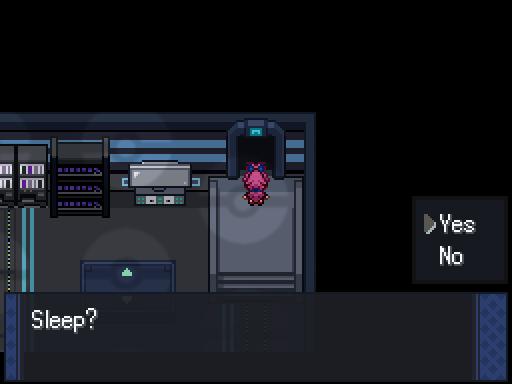
Paragon Route
Rest when the option appears, and the Chapter 16 story will continue.
Play after Paragon
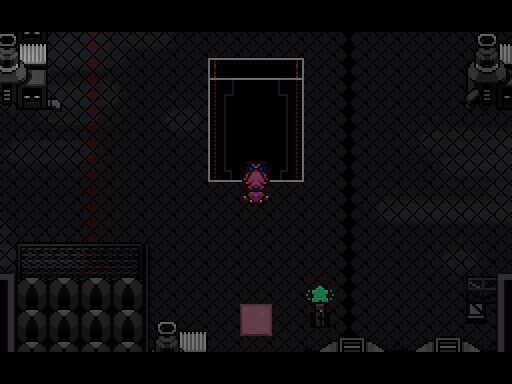
Renegade Route
Go to the Plane of Dissonance and look for a quest bubble marked with an exclamation point. Interact with the board to begin.
Android players
JoiPlay and Kirin Versions
v14 has separate downloads for JoiPlay and Kirin. Both versions are experimental and may have issues that cannot be fixed by the Rejuvenation team.
JoiPlay
A JoiPlay version is available, but some problems may depend on the JoiPlay app rather than Pokemon Rejuvenation.
Kirin
A Kirin version is also available, but compatibility and performance may depend on the emulator.
Mobile versions are experimental
Use the Windows, macOS, or Linux version when possible. Some mobile problems may require changes from the emulator developers.
Other v14 changes
What Else Changed in v14?
These additions do not change the installation steps, but they are useful to know before continuing or starting a new playthrough.
Generation 9 Pokemon
v14 adds Generation 9 content and updates a number of Pokemon movesets.
Z-A Mega Pokemon
Mega stones and sprites were added for newer Mega Pokemon. Only those with officially confirmed abilities are currently available.
Expanded New Game+
v14 expands New Game+ and adds extra prologue content when the game detects a completed v14 save.
Act 2 Password
A new password can begin a playthrough at Act 2, Chapter 9. The creator describes this option as experimental.
Discord Integration
Pokemon Rejuvenation now supports Discord activity integration while the game is running.
No Randomizer Yet
Randomizer support was not ready for the v14 release because of major system changes. It may be added later.
Setup help
Pokemon Rejuvenation v14 Setup Questions
Answers to common questions about moving from v13.5 to v14.
Can I copy v14 into my v13.5 folder?
No. Extract v14 into a separate folder. Merging both versions may leave old or conflicting game files.
Do I need to start a new game?
You can continue a compatible v13.5 save. Move outside all unsafe locations, save again, and make a backup before opening it in v14.
Can I use the old updater?
No. v14 requires a new download. The updater is now included inside the game for later patches.
Should I play Paragon or Renegade first?
Complete Chapter 16 on Paragon first. Renegade assumes that you already know information revealed during Paragon.
How do I begin Chapter 16 on Paragon?
Use the rest or sleep option when it appears. The story will continue after you confirm it.
How do I begin Chapter 16 on Renegade?
Go to the Plane of Dissonance, find the exclamation-point quest bubble, and interact with the nearby board.
Are JoiPlay and Kirin fully supported?
No. Downloads are available, but both versions are experimental. Some problems can only be addressed by the app or emulator developers.
Ready to update?
Download Pokemon Rejuvenation v14
Back up your save, install v14 in a separate folder, and continue your journey through Chapter 16.